Wix vs Squarespace in 2026: which is better for local businesses?
Wix and Squarespace look affordable, but are they right for local businesses? This guide compares pricing, ease of use, SEO and the real cost of building your own site.

In short
Wix and Squarespace are affordable DIY builders, but they require 20+ hours of your time to set up. For most local businesses, having your website built and managed for you saves time, produces a stronger result, and costs less than you think.
If you are a local business owner looking at Wix and Squarespace, the real question is not simply which platform is better.
The more useful question is whether either of them is actually the right choice for you.
I have seen plenty of local business owners get stuck at this point. Not because they are doing anything wrong, but because building a website properly involves far more small decisions than most people expect.
On the surface, both platforms look appealing. They are well-known, affordable, and promise that you can build a professional-looking website without needing to code or hire a developer.
That sounds ideal when you are trying to keep costs down and just want to get something live.
But the reality is that a website builder only gives you the tools. It does not write your copy, work out what your customers need to know, structure your services properly, set up your local SEO, choose your images, connect your domain, check everything on mobile or keep the site maintained afterwards.
That work still lands with you.
And if you are already running a local business, that usually means squeezing it into evenings, weekends, lunch breaks or those rare quiet moments when you were hoping to catch up on admin, spend time with family, or simply stop thinking about work for half an hour.
In simple terms, Wix gives you more flexibility. Squarespace gives you a cleaner design framework. Neither one removes the biggest challenge for most local business owners: finding the time, headspace and confidence to turn those tools into a website that looks professional, works properly, and helps bring in enquiries.
This article compares Wix and Squarespace for local businesses in the UK, then looks at the real cost of building your own website.
Important note on pricing and features: the prices, plans and service details referenced in this article are correct at the time of publication on 22nd May 2026. Website builder pricing and features change regularly, so always check the latest details directly with each provider before making a decision.
Pricing comparison: what you actually pay
Both Wix and Squarespace offer tiered pricing. At the time of publication, UK pricing is broadly positioned as follows.
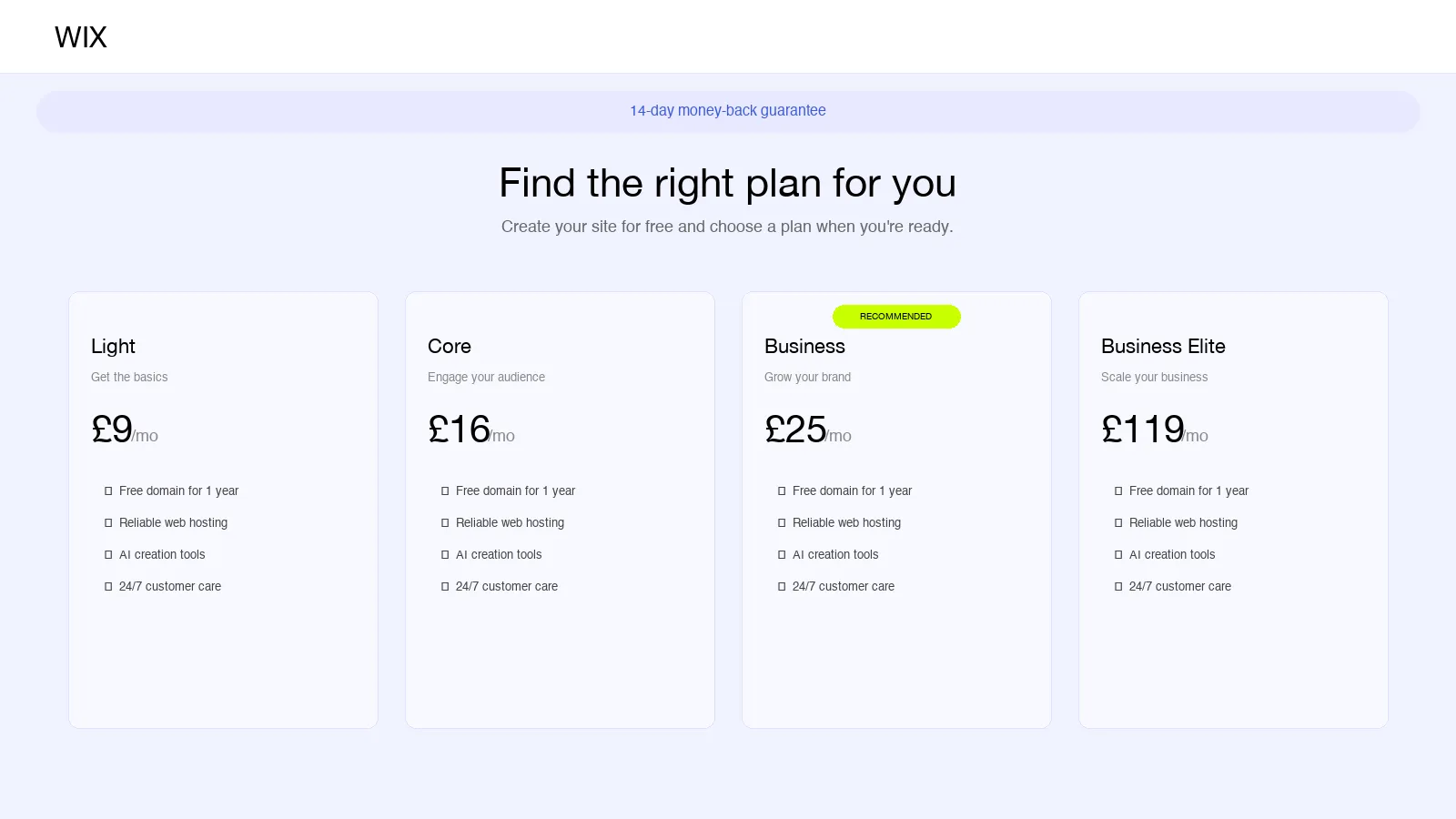
Wix pricing in the UK
| Plan | Annual billing | Monthly billing |
|---|---|---|
| Light | £9/mo | £11.50/mo |
| Core | £16/mo | £19/mo |
| Business | £25/mo | £15/mo |
| Business Elite | £119/mo | N/A |
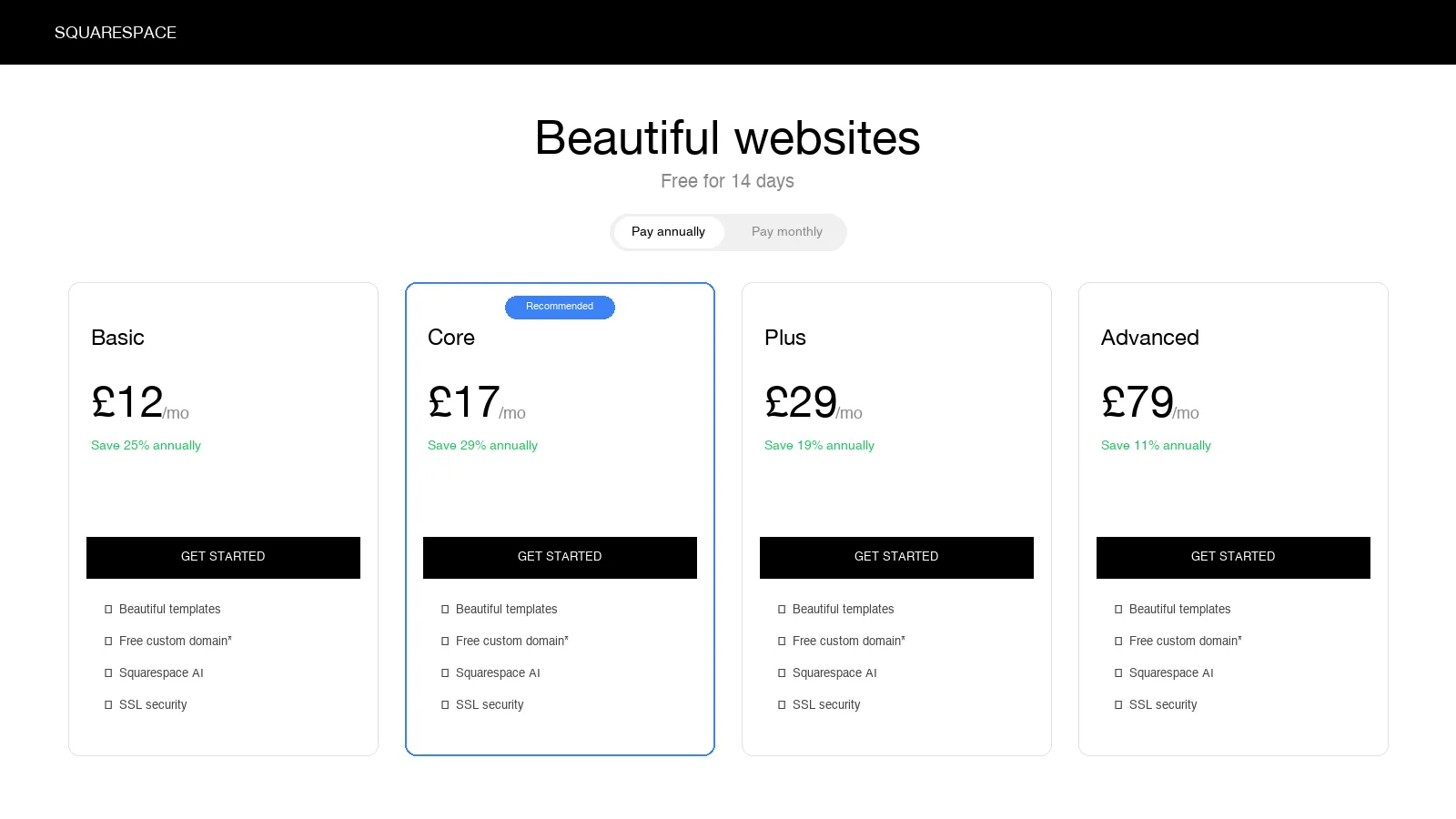
Squarespace pricing in the UK
| Plan | Annual billing | Monthly billing |
|---|---|---|
| Basic | £12/mo | £16/mo |
| Core | £17/mo | £24/mo |
| Plus | £15/mo | £36/mo |
| Advanced | £79/mo | £89/mo |
Both platforms include hosting and SSL certificates. Both also usually include a free domain for the first year on eligible annual plans, with renewal costs applying after that.
On paper, Wix is slightly cheaper at entry level. Squarespace is slightly more expensive, but its templates and design system may reduce the amount of time needed to get something that looks polished.
However, the monthly subscription is only one part of the cost. It pays for access to the platform. It does not build the website for you.
This is where a lot of local business owners get caught out.
What you get with Wix and Squarespace
Both platforms give you the basic tools needed to create a website.
You typically get:
- A visual website editor
- Templates to start from
- Mobile-friendly layouts
- Basic SEO settings, such as page titles and meta descriptions
- Image upload tools
- Hosting and SSL included
- A way to connect your domain
- Basic analytics or reporting options
For some business owners, that may be enough.
If you enjoy learning new tools, have time to write your own content, and feel confident making design decisions, either platform can be a reasonable starting point.
But the platform gives you the building blocks. You still have to make the decisions, write the words, structure the pages and turn those tools into a website that customers can understand and trust.
This is usually the point where the "quick website job" starts to feel like another job on top of the one you already have.
What Wix and Squarespace do not do for you
This is the part most comparison articles brush past too quickly.
Wix and Squarespace can help you create a website. They do not automatically create a strong local business website.
You are still responsible for:
- Writing every page of website copy
- Explaining your services clearly
- Choosing and preparing images
- Making sure the site feels trustworthy
- Structuring pages around the services people actually search for
- Setting up local SEO properly
- Connecting and monitoring Google Search Console
- Creating or optimising your Google Business Profile
- Adding structured data so Google understands your business, services and location
- Checking the site works properly on mobile
- Updating content when your services, prices or offers change
- Fixing layout, design or technical issues when they crop up
That is not a criticism of Wix or Squarespace. They are website builders. They are not a complete website strategy, copywriting service, SEO setup and maintenance service in one.
And they definitely do not know your business the way you do.
This is one of the biggest reasons DIY sites often end up feeling a little flat. The template may look clean, but the words can feel generic. The pages may be there, but the personality is missing. The site may technically exist, but it does not always feel like the real business behind it.
For a local business, that matters.
People are not just choosing a service. They are choosing who they feel comfortable contacting. They want to know what you do, where you work, how you help, whether you seem reliable, and whether you feel like the right person or business for the job.
That does not come from a template on its own. It comes from clear copy, local understanding and a website that feels like it was built around the business, not dropped into a layout and left there.
Ease of use: Wix vs Squarespace
Wix
Wix uses a true drag-and-drop editor. You can move elements around the page with a lot of freedom, which makes it feel flexible and easy to experiment with.
That flexibility is one of Wix's biggest strengths. It is also where things can start to wobble.
Because you can place almost anything almost anywhere, it is easy to create a site that looks inconsistent, cluttered or awkward on mobile. You may find yourself spending more time than expected tweaking sections, adjusting spacing, fixing mobile layouts and trying to make pages feel consistent.
If you enjoy that sort of thing, fine. Some people do.
But if your week is already full of customers, bookings, quotes, stock, invoices, staff, suppliers or site visits, the last thing you may want to do on a Sunday evening is nudge boxes around a page because the mobile version does not look right.
Wix also offers AI-assisted website building features, which can help you get started faster. These tools can be useful for creating an initial structure, but they still need reviewing, editing and tailoring to your actual business.
The main thing to know is that once you build a Wix site around a particular template, switching to a completely different template is not straightforward. In practice, a major template change can mean rebuilding or manually moving content across.
Squarespace
Squarespace uses a more structured, section-based editor.
You get less design freedom than Wix, but more guardrails. For many local business owners, this is a good thing. The templates are cleaner, the layouts are more controlled, and it is harder to make the site look messy by accident.
Squarespace sites often feel more polished out of the box, especially for businesses where presentation matters. That could include salons, studios, consultants, food businesses, creative services, wellness brands and professional services.
The trade-off is flexibility. If you want to heavily customise the layout or create something very specific, you may hit limits faster than you would with Wix.
You still need to know what to say, how to structure the pages, what images to use, which sections matter, and how to guide people towards an enquiry.
Ease of use verdict
Wix is easier to start playing with.
Squarespace is more likely to produce a clean, professional-looking result with fewer design decisions.
For a busy local business owner, Squarespace may feel less chaotic. For someone who wants maximum control and does not mind spending time tweaking, Wix may be the better fit.
But neither platform removes the thinking. You still need to decide what your site should say, how it should be organised, and what will make someone trust you enough to get in touch.
Design quality
Squarespace has traditionally had the edge on design. Its templates tend to feel cleaner, more modern and more premium out of the box.
This matters because local business websites are often judged quickly. A potential customer looking for a gardener, dog groomer, beauty therapist, consultant, electrician, decorator, cleaner, therapist or tradesperson will often make a trust decision within seconds.
They want to know:
- Does this business look professional?
- Do they clearly explain what they do?
- Do they serve my area?
- Can I trust them?
- Is it easy to enquire?
A good-looking site does not guarantee enquiries. But a poor-looking site can lose trust and cost you enquiries before the customer even reads the page properly.
Wix offers a large number of templates and more creative freedom, but that freedom can lead to inconsistency if you are not confident with design. Squarespace offers fewer templates, but the overall quality and consistency is usually stronger.
For most local service businesses, a clean, simple, trustworthy website is better than a heavily customised one that looks busy or inconsistent.
There is another point here too.
A website should not just look tidy. It should feel like your business.
DIY builders can struggle here. Templates can make lots of businesses feel similar. The colours change, the images change, but the personality can still feel thin. If someone lands on your site and it sounds like every other small business website, you have missed a chance to build trust before they ever pick up the phone.
SEO: how well will Google find you?
Both Wix and Squarespace offer basic SEO tools.
You can usually edit page titles, meta descriptions, URL slugs, image alt text and other basic settings. Both platforms also generate sitemaps and provide ways to connect your site with search tools.
Wix has an SEO assistant that guides beginners through some of the setup steps. Squarespace has also introduced AI visibility features designed to help website owners understand how their site may appear in AI-powered search experiences.
These are useful features. But they should not be confused with a complete SEO strategy.
Ranking in local search requires more than ticking off platform settings. If you want to appear for searches such as "gardener in Cheltenham", "dog groomer in Bristol", "beauty therapist near me" or "electrician in Gloucester", you need:
- Keyword research specific to your services and locations
- Clear service pages written around how customers search
- Location relevance across the site
- Proper internal linking
- A verified and optimised Google Business Profile
- Accurate business details across the web
- Helpful, trustworthy content
- Structured data that helps Google understand your business, services and location
- A site that loads quickly and works well on mobile
- Regular checks to make sure the basics are working properly
Wix and Squarespace give you the tools to do some of this. They do not do the strategic work for you.
For a local business, that distinction matters. Basic SEO settings can help Google understand your pages. But strong local SEO is about making your business visible, relevant and trustworthy in the places your customers are searching.
What real small business owners often discover
These are the issues I see small business owners run into when they try to build their own website.
It takes longer than expected
Website builders make the setup look quick. In reality, many business owners spend far longer than planned choosing templates, writing content, finding images, changing layouts and trying to get everything looking right.
A site that looks simple on the surface can still take 15 to 40 hours to finish properly.
And that time has to come from somewhere.
Usually it comes from evenings, weekends, family time, admin time, or the hours you should be using to get quotes out, follow up enquiries, reply to customers or simply switch off. And when you are still adjusting the mobile layout at 10pm, it stops feeling like a money-saving exercise.
The copy is harder than the build
Many people assume the technical side will be the difficult part.
Often, the harder job is writing the website copy.
You need to explain what you do, who you help, where you work, why someone should choose you, what happens next, and how to enquire. That sounds simple until you are staring at a blank page trying to describe your own business clearly, without sounding stiff, vague or exactly like everyone else.
It is even harder when you are too close to the business.
You know what you do. You know the little details that make you good at it. But turning that into clear, useful website copy for someone who has never met you is a different skill.
This is why so many DIY websites end up with vague phrases like "professional service", "high-quality solutions" or "get in touch today", without saying much that feels specific, local or memorable.
AI tools can help with this, and they can be useful for getting ideas down or shaping a first draft. But they still need direction, editing and a proper human check. If you simply copy and paste AI-written text onto your website, it can easily miss your tone of voice, get details wrong, make claims that are not quite accurate, or sound like every other small business website.
There is also a risk if the content is thin, unhelpful or only there to fill space on a page. The question Google asks is whether the content is useful, accurate and written for real people. That does not happen automatically, whatever tool you use. It still takes thought, editing and an understanding of your business.
The design decisions pile up
What should go on the homepage? How many service pages do you need? Should prices be shown? Which images should be used? What should the buttons say? How long should the pages be? How do you make it look good on mobile?
None of these decisions are impossible. But together, they take time.
And every decision you put off makes it easier for the website to sit unfinished.
The basic plan is not always enough
The cheapest plan may not include everything you need. Business features such as online payments, booking functionality, advanced analytics, extra storage or removing platform branding may require a higher tier.
That does not mean the platforms are poor value. It simply means the headline monthly cost may not reflect what your business actually needs.
Support has limits
Wix and Squarespace both offer support, but support teams are there to help you use the platform. They are not there to write your service pages, plan your local SEO, improve your enquiry rate or decide how best to position your business.
This is where many business owners get stuck.
They do not necessarily need more help articles or another support chat. They need someone who can take the job off their hands and get it done properly.
The real cost of "cheap"
A Wix Core plan may cost around £16 per month when paid annually. A Squarespace Core plan may cost around £17 per month when paid annually.
That looks cheap. And in one sense, it is.
But the subscription is not the real cost.
The real cost is the time you spend:
- Learning the platform
- Choosing a template
- Writing the copy
- Finding and editing images
- Building each page
- Checking the mobile layout
- Setting up SEO basics
- Connecting your domain
- Testing forms
- Trying to understand why the site is not appearing in Google
- Maintaining it after launch
If you are a tradesperson, local service provider or small business owner charging £40 to £60 per hour for your actual work, 20 to 30 hours spent building your website could represent £800 to £1,800 of lost earning time.
But even that does not tell the full story.
Because not every hour has a neat financial value.
Some of those hours might be the time you normally spend with your family. Some might be the evening you finally had free. Some might be the admin time you needed to catch up properly. Some might be the breathing space that stops running a business from feeling like it has taken over everything.
The monthly subscription is the cheap part.
Your time, energy and headspace are the expensive parts.
So which one should you choose?
If you have decided that a DIY website builder is the right route, here is the simplest way to think about it.
Choose Wix if:
- You want maximum design flexibility
- You like drag-and-drop editing
- You are happy to spend time tweaking layouts
- You may need booking or scheduling features
- You want phone support as an option
- You are comfortable with the template limitations later on
Choose Squarespace if:
- You want a clean, polished website with less design effort
- You prefer a more structured editing experience
- You want strong mobile responsiveness out of the box
- You are happy working within template constraints
- You care about visual presentation
- You are interested in newer AI visibility features
When a website builder is the wrong choice
A DIY website builder may not be the right route if:
- You do not have 15 to 40 hours to spare
- You do not want to write your own website copy
- You are not confident setting up local SEO
- You keep putting the website off because the whole thing feels like a faff
- You want someone else to handle the domain, hosting and launch process
- You want the website live quickly without having to learn the platform yourself
- You do not want to spend evenings and weekends trying to fix layouts, write service pages or work out what Google needs
- You want ongoing maintenance included, so the site does not become another thing on your to-do list
If that sounds familiar, there is nothing wrong with you. It does not mean you are bad at business, bad with technology or not trying hard enough.
It probably just means your time is better spent elsewhere.
The alternative: get it built for you
Wix and Squarespace are both solid platforms.
But they are tools, not complete solutions.
They give you the building blocks. You still have to do the building.
For some business owners, that is perfectly fine. If you enjoy DIY, have the time, and want full control, either platform can work well.
But if you are running a local business, your time is usually better spent serving customers, quoting jobs, managing enquiries, catching up on admin, spending time with your family, or doing the work that actually brings money into the business.
That is where Launch My Local Site is different.
At Launch My Local Site, I build and manage websites for local businesses that want a professional site without the hassle of doing it themselves.
You do not have to start from a blank template. You do not have to write every word yourself. You do not have to spend your evenings trying to make the mobile version behave. You do not have to work out what pages you need, how to structure your services, or how to get the basics in place for Google.
I handle the copy, design, setup, domain, hosting, Google Business Profile support, SEO basics, getting the site submitted to Google and ongoing maintenance.
You spend around 30 minutes telling me about your business. I do the rest.
The aim is simple: to give you a website that clearly explains what you do, where you work and how people can get in touch, without making the process feel like another job.
It costs more than a DIY website builder subscription.
But it can cost a lot less than losing 30 hours of your own time, energy and patience trying to build the website yourself.
If you want to see what that looks like for your trade, we have written up what the pages actually need for barbers, hair salons, builders, plumbers and heating engineers, dog groomers, florists and care providers.
Already on Wix or Squarespace and ready to hand it over? This is how we move your website, keeping your domain, email and Google visibility.
Don't want to build it yourself?
We build your website for you: tailored copy, SEO setup, domain, hosting, and ongoing maintenance included. Just £450 one-off build + £15/mo hosting.
Get startedFrequently asked questions
Both can work for local businesses, but it depends what you need from the website and how much time you realistically have. Wix gives you more flexibility and more control over page layouts. Squarespace gives you a cleaner, more structured design system that can be easier to keep looking polished. But for many local business owners, the platform is not the biggest issue. The harder part is finding time to write the copy, plan the pages, set up local SEO, choose the right images, connect the domain and keep the site maintained afterwards. If you want to do all of that yourself, Wix or Squarespace may be fine. If you want someone to take the stress and hassle out of the process, a managed service like Launch My Local Site may be a better fit.
The monthly subscription is cheaper. But the real cost includes your time. Many business owners spend 15 to 40 hours building and maintaining a DIY website. If that time could have been spent on paid work, quoting, sales, admin, customer delivery or time with family, the true cost is much higher than the platform subscription. A managed service costs more each month, but it can save you time, stress and a lot of unfinished evenings.
Not directly in a simple one-click way. If you want to move from Wix to Squarespace, or from Squarespace to Wix, you should expect to rebuild much of the site manually. That usually means moving content, images, settings and page layouts across yourself. It is worth getting the decision right first time rather than building twice.
Both platforms provide basic SEO tools, including page titles, meta descriptions, URL settings and sitemaps. However, they do not automatically create a full local SEO strategy for your business. You still need properly written service pages, local keyword targeting, a strong Google Business Profile, relevant content, and regular checks to make sure the basics are working properly. With Launch My Local Site, the SEO basics are handled as part of the setup, so your website is built with local visibility in mind from the start.
No. Launch My Local Site is a managed website service. The focus is not on giving you a DIY builder to learn. The focus is on getting a professional website built, launched and maintained for you. That means you are not paying for another tool to figure out. You are paying to have the website handled.
With a DIY builder, it depends how much time you can put into it. Some business owners get something online quickly, but many take several weeks because the copy, images, layout, setup and decision-making take longer than expected. With Launch My Local Site, the process is designed to be quicker and simpler because I handle the build for you after an initial business information stage. You tell me about your business. I turn that into a professional website that is written, built and set up for you.