Rated
The WordPress security update: what it means for your small business website
WordPress 7.1.4, released on 28th October 2026, fixes 22 security problems, and attackers are already trying one of them. How to check your site has the update, why your plugins matter even more, and what to do if nobody looks after your website.

In short
On 28th October 2026, WordPress released version 7.1.4, which fixes 22 security problems. One of them, a flaw in the way WordPress updates itself, is now being targeted by attackers, and the US cyber security agency CISA confirmed active exploitation on 3rd November. Most WordPress sites install this kind of update automatically, but not all do, and WordPress plugins, which do not update themselves unless you turn that on, had more than 150 critical flaws published in October alone, by our count. Check your site is on 7.1.4 (or the fixed version for your branch), update your plugins, and ask your host to confirm the server software underneath is patched.
Is your WordPress site up to date? Check it in seconds
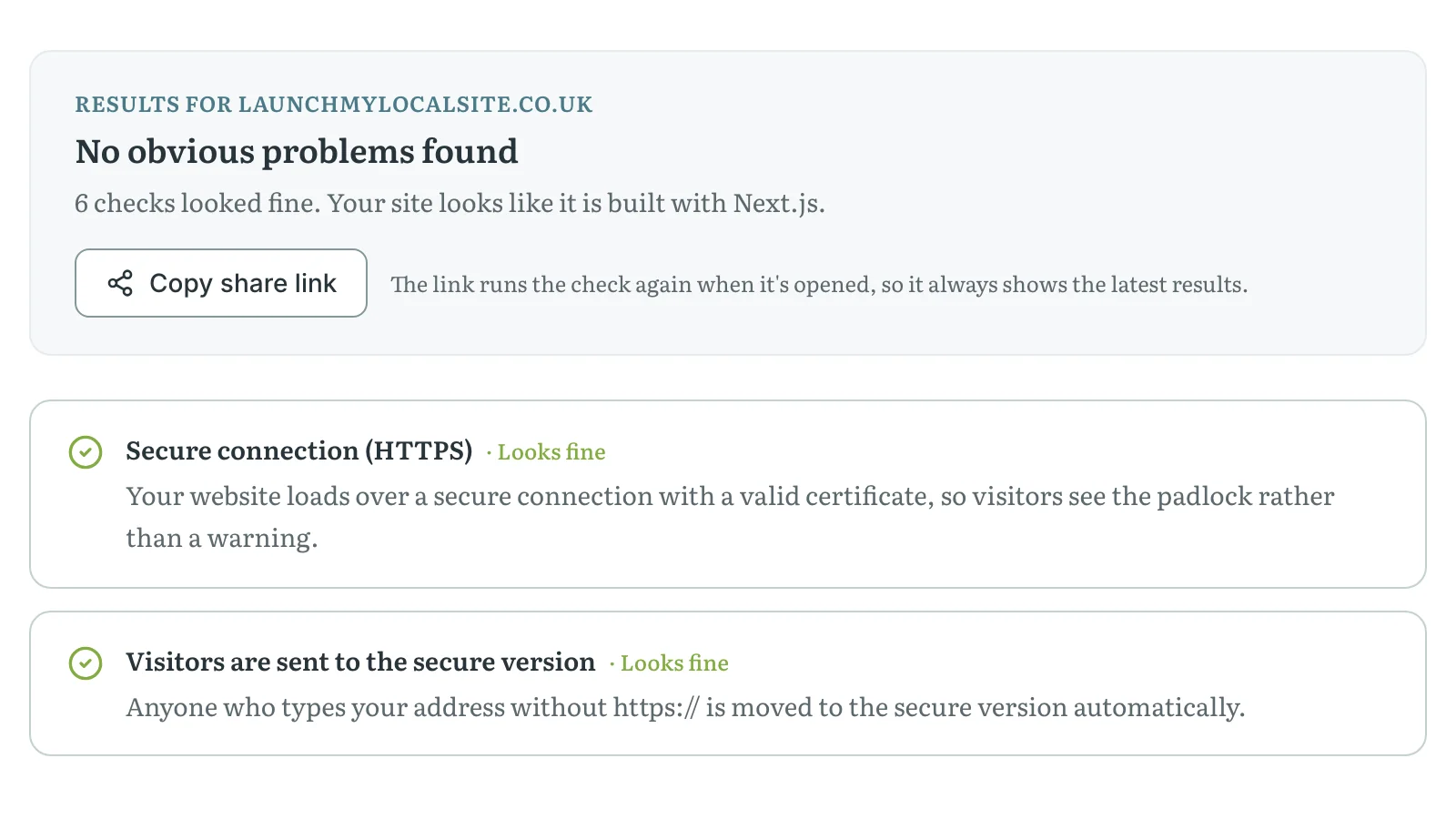
Our free website security check shows what your site is built with, whether it runs on PHP, and other gaps worth closing, such as emails that could be faked in your name.
Run the free security checkOn Wednesday 28th October 2026, WordPress released version 7.1.4. It fixes 22 security problems in WordPress itself, and a week later attackers are already trying one of them. On 3rd November the US cyber security agency CISA added that flaw to its list of vulnerabilities known to be exploited, the same day the head of the UK's National Cyber Security Centre (NCSC) warned of "a real prospect of an unprecedented rise in the number of cyber incidents" in the coming months.
WordPress runs about four in every ten websites in the world, including a huge number of small business sites. If yours is one of them, this article explains in plain English whether you are affected, how to check your site in five minutes, and why your plugins matter even more than WordPress itself.
What happened
WordPress releases small security updates every few weeks, and most pass without anyone noticing. This one is different for two reasons.
First, it is a big one. Version 7.1.4 fixes 22 separate security problems, according to WordPress's own release notes, and the fixes have been copied back to every older version of WordPress from 4.7 onwards.
Second, one of those problems is already being used. The flaw, recorded as CVE-2026-119977, is in the way WordPress updates itself. For the few seconds while a site downloads and unpacks a full update, the files sit in a folder whose name an attacker can guess. If the attacker reaches that folder at exactly the right moment, they can run their own code on your website. The fix in 7.1.4 makes that folder's name random.
WordPress itself rates the problem "low", because it only works during that short update window. The US National Vulnerability Database scores it 8.1 out of 10, rated high, and CISA has confirmed real attacks. The security company Wordfence logged more than 18,500 attempts in the first 21 hours after the fix was released. Attackers are clearly trying, and the safe answer is the same either way: make sure your site has the update.
Is your website affected?
If your website runs on WordPress, it needs this update. Every version from 4.7.0 to 7.1.3 is affected. The fixed versions are:
- WordPress 7.1.4 if you are on the current 7.1 branch
- 7.0.8, 6.9.11, 6.8.12 and matching releases for older branches, right back to 4.7.39
- Versions 4.6 and older get no fix at all. If your site is that old, it needs a proper upgrade, and it almost certainly has other problems too
If you are not sure whether your site runs on WordPress, the usual giveaway is that you edit it by logging in at an address ending in /wp-admin. Our free security check will also tell you what your site is built with.
Does WordPress update itself automatically?
Usually, for security releases like this one. Since 2013, WordPress has installed small security updates automatically by default, and the 7.1.4 announcement says sites that support automatic updates will start updating on their own.
But "usually" is not "always". Automatic updates can be switched off by a developer, by a plugin or by your hosting company, often years ago and for reasons nobody remembers. That is why it is worth spending five minutes checking rather than assuming.
Are Wix and Squarespace sites affected?
No. Wix and Squarespace are separate website builders that do not run WordPress, so neither this flaw nor the WordPress plugin flaws below apply to them. There is nothing for you to install. As always, keep your account password strong and turn on two-step login.
Are our websites affected?
Websites on our own platform are not affected, because they do not run WordPress, plugins or a database at all. WordPress sites we look after are updated as part of their monthly care.
How to check your WordPress site in five minutes
You do not need to be technical for any of this.
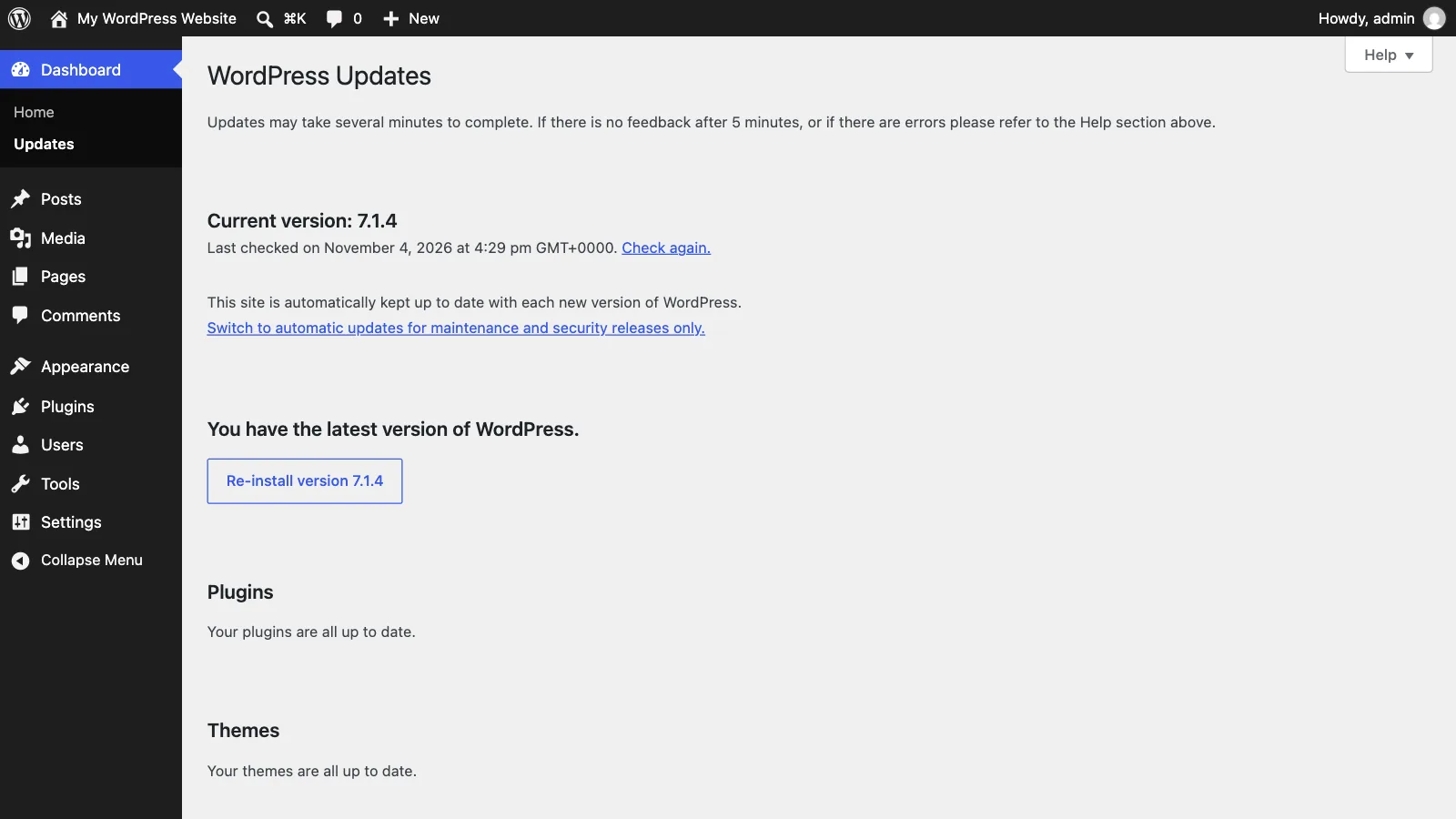
- Log in and go to Dashboard, then Updates. The page tells you which version you are on. You want 7.1.4, or the fixed version for your branch listed above. If it offers an update, it has not installed itself.
- If you need to update, take a backup first. Most hosts include backups, or your backup plugin can make one. Then click to update, or ask your host or web person to do it today.
- Update your plugins and themes on the same screen. This is the step most small business sites miss, and it matters more than WordPress itself, as the next section explains.
- Delete plugins you no longer use. A plugin that is switched off can still be a way in if its files are on the server. If you do not need it, delete it rather than just deactivating it.
- Ask your host one question about the server. WordPress runs on server software that only your host can update. Ask them to confirm that PHP has the October 2026 security fixes and the 19th November release, and that the server is fully patched. Our PHP security flaw article explains why.
- If you use the free version of Wordfence, be aware its firewall protection for this flaw only arrives on 27th November 2026. Until then, the update is what protects you.
If you cannot log in, do not know who has the password, or nobody has looked at the site in a year or more, that is the real problem to fix, and it is worth sorting out now rather than at the next emergency.
The bigger risk for most sites: plugins
WordPress itself is well looked after by a large, experienced team. The plugins that add contact forms, booking calendars, sliders and shops are written by thousands of different people, some of whom stopped updating them years ago. That is where most small business sites actually get broken into.
October 2026 shows the scale of it. By our count of the US National Vulnerability Database, more than 150 critical security flaws in WordPress plugins, each rated 9 out of 10 or higher, were published in that month alone. Many of those plugins are on tens of thousands of small business sites:
| Plugin | What it does | Sites using it |
|---|---|---|
| Ultimate Member | Member logins and profiles | About 200,000 |
| Popup Builder | Pop-up offers and sign-up forms | About 200,000 |
| LatePoint | Appointment booking | About 100,000 |
| Amelia | Appointment and event booking | About 90,000 |
| JetFormBuilder | Contact and enquiry forms | About 80,000 |
| FluentCRM | Email marketing and customer records | About 80,000 |
If your site uses any of these, make sure it is on its latest version. One flaw, in the Bricksforge add-on, was being used by attackers from 7th October, the day before it was publicly reported.
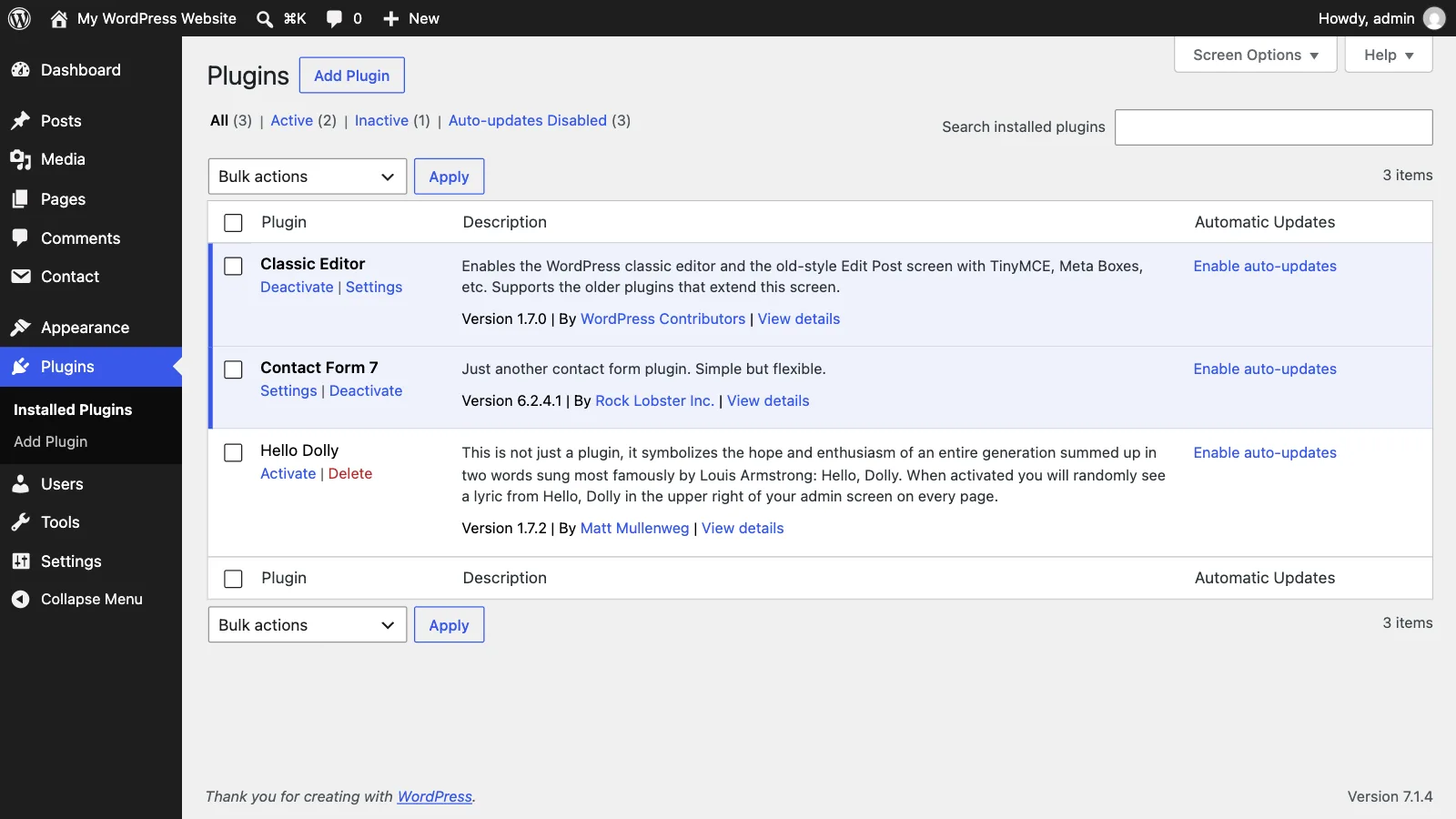
The catch is that plugins do not update themselves unless you tell them to. On the Plugins screen in your dashboard, each plugin has an "Enable auto-updates" link. Turning it on for plugins you trust, and checking the rest every couple of weeks, closes most of the gap.
What your host needs to do
A WordPress site sits on a stack of software that you never see: PHP, which WordPress is written in, and the web server underneath. In the last two weeks there have been critical fixes for both. The PHP flaws fixed on 21st October are covered in our earlier article, and on 27th October CISA also listed a flaw in a compression library used by many web servers as being actively exploited.
You cannot fix either of these from your WordPress dashboard. They are your hosting company's job, which is why one short email asking them to confirm the server is fully patched is worth sending this week.
Update, 19th November 2026: there are two more server updates for your host to install. PHP released a further set of security fixes on 19th November, and nginx, the web server software many hosts use, released versions 1.30.7 and 1.31.9 on 18th November to fix flaws of its own. Neither can be fixed from your WordPress dashboard either. Our PHP article explains both.
Think your site has already been hacked?
The common signs are:
- Admin users or files nobody recognises
- Pages that redirect visitors to other websites
- Spam links, or pages you did not create, appearing in Google results for your site
- A warning from the browser or Google when people visit
- An email from your host about unusual activity
If you see any of these, contact your host or web person straight away, change your WordPress and hosting passwords, and turn on two-step login. If nobody looks after your site, get in touch and I'll look at it and tell you plainly what it needs.
Why this keeps happening, and how we build websites differently
Two critical security stories in a fortnight is not bad luck. A WordPress site depends on PHP, WordPress, a theme and a handful of plugins, each updated on its own schedule by different people, and the site is only as safe as the most neglected piece. For a business owner with no web person, keeping all of that current is a job nobody signed up for.
Websites on our own platform are built differently. They are built in advance, checked, and served as finished pages from Cloudflare's network. There is no WordPress, no plugins and no database on a server, so flaws like this one have nothing to attack, and there is far less to keep patched in the first place.
| A typical WordPress site | A website on our platform | |
|---|---|---|
| What needs keeping up to date | PHP, WordPress, the theme and every plugin | Far less: no WordPress, plugins or database |
| When a flaw like this appears | Someone has to update it, ideally the same day | This flaw has nothing to attack |
| Plugins, each updated by someone different | Every one you have installed | None |
| Who looks after it | You, your host or your web person, if you have one | We do, for £15 a month |
No website is risk-free. Your domain account, email and logins still need strong passwords and two-step login, and we help you get those right. But the less software running on a server, the less there is for an attacker to aim at.

Case study
Woodside Luxury Cattery: nothing on the server for this flaw to attack
woodsideluxurycattery.co.uk (opens in a new tab)Woodside's new website is built as finished pages served from Cloudflare's network, with no PHP, database or plugins on a server, so a flaw like this one has nothing to attack. We also hid Debbie's email address from the bots that scrape websites for spam.
Read the case study- and no database running on a server
- No PHPand no database running on a server
- so nothing waiting for security updates
- No pluginsso nothing waiting for security updates
- from the bots that harvest addresses for spam
- Email hiddenfrom the bots that harvest addresses for spam
How we can help you get secure, and stay that way
Whichever route suits you, it starts with a free website check, where we look at what your site runs on and what condition it is in, and tell you plainly which option makes more sense.
1. Keep your WordPress site, looked after properly. We move it to our hosting, take a full backup, and bring everything current: WordPress, your theme, your plugins and PHP. Plugins that are abandoned or not needed are replaced or removed. From then on, security releases like 7.1.4 are applied for you the same day. It costs £295 to set up, then from £95 a month, including 30 minutes of changes. See website maintenance.
2. Move to our own platform. We rebuild your website so it no longer needs WordPress or plugins at all. Your domain and email stay where they are, your old page addresses are redirected so you keep your place in Google, and your content comes across, tidied up where it helps. It costs £450 once you have approved the new site, then £15 a month for hosting, security, updates and small changes. See how moving your website works.
Either way, the point is the same: someone is responsible for your website, keeps it current, and acts the same day when something like this happens.
What to do now
For most WordPress sites, this update will already have installed itself, and five minutes in your dashboard will confirm it. If it has, the job is done for WordPress itself, though your plugins deserve the same five minutes.
The bigger lesson is the same as it was after the PHP flaw a fortnight ago. The sites that get broken into after news like this are rarely the ones with a careful owner. They are the ones nobody has logged in to for years, with automatic updates switched off and plugins nobody remembers installing. If that sounds like yours, we can help.
And if you are simply not sure where your website stands, ask me to check it. I'll give you a clear answer on whether you're at risk and what to do next.
Sources
- WordPress 7.1.4 Security Release, WordPress.org, 28th October 2026
- Version 7.1.4 release notes, WordPress.org documentation, listing the 22 security fixes
- WordPress security advisory GHSA-4w3m-c66w-69mg, WordPress core team
- CVE-2026-119977, US National Vulnerability Database
- Known Exploited Vulnerabilities catalog, CISA, entry added 3rd November 2026
- WordPress 7.1.4 security release, Wordfence
- Bricksforge vulnerability exploited in the wild, Patchstack, 8th October 2026
- Richard Horne's speech at the NCSC Annual Review 2026 launch, National Cyber Security Centre, 3rd November 2026
- Critical security issue affecting PHP, National Cyber Security Centre
- Upgrading WordPress, WordPress developer documentation, on automatic background updates
- Usage statistics of WordPress, W3Techs, 4th November 2026
- The October 2026 plugin figure is our own count: WordPress plugin vulnerabilities rated 9.0 or higher and published to the US National Vulnerability Database between 1st and 30th October 2026, excluding rejected entries. Plugin site counts are from WordPress.org.
Not sure your WordPress site is safe? I'll check it for you
Send me your website address and I'll tell you clearly, free and with no obligation, whether it looks up to date, how serious any gaps are, and what your next steps should be. If it needs bringing up to date, looking after or moving, I can do that too, with the price agreed before anything starts.
Check my websiteFrequently asked questions
WordPress 7.1.4, released on 28th October 2026, fixes 22 security problems in WordPress itself. The most talked about is a flaw in the update process (CVE-2026-119977) that can let an attacker run their own code on a site while it is in the middle of updating. The US National Vulnerability Database rates it 8.1 out of 10, and on 3rd November 2026 the US cyber security agency CISA confirmed it is being actively exploited.
It is if your site is on any WordPress version from 4.7.0 to 7.1.3 and has not yet installed the fix. The fixed versions are 7.1.4, or the matching security release for older branches, such as 7.0.8, 6.9.11 or 6.8.12. Versions 4.6 and older get no fix at all and need upgrading. You can see your version in your WordPress dashboard under Dashboard, then Updates.
Usually, for security releases like this one. Since version 3.7, WordPress has installed minor and security updates automatically by default, and the WordPress 7.1.4 announcement says sites that support automatic background updates will start updating on their own. But automatic updates can be switched off, by a developer, a plugin or your host, so it is worth checking rather than assuming. Plugins and themes do not update themselves unless you turn that on.
Log in to your WordPress dashboard and go to Dashboard, then Updates. The page tells you which version you are on and whether a newer one is available. The version number also appears in the At a Glance box on the main dashboard. If you do not know how to log in, or who has the password, that is worth sorting out now.
Yes, and for most small business sites the plugins are the bigger risk. WordPress plugins do not update automatically unless you switch that on for each one, and more than 150 critical flaws in WordPress plugins were published in October 2026 alone, by our count of the US National Vulnerability Database. Update every plugin and theme, turn on automatic updates for the ones you trust, and delete any you no longer use.
No. Wix and Squarespace are separate website builders that do not run WordPress, so this flaw and WordPress plugin flaws do not apply to them, and there is nothing for you to install. As with any website builder, keep your account password strong and turn on two-step login.
Attackers are certainly trying. CISA added the flaw to its list of known exploited vulnerabilities on 3rd November 2026, and the security company Wordfence logged more than 18,500 requests aimed at it in the first 21 hours after the fix was released. No UK small business victims have been named publicly. Attacks only work while a site is in the middle of a particular kind of update, which is why installing 7.1.4 closes the gap.
Common signs are admin users or files nobody recognises, pages that redirect visitors to other sites, spam links or strange pages appearing in Google results for your site, a warning in the browser or in Google when people visit, or an email from your host about unusual activity. If you see any of these, contact your host or web person straight away, change your passwords and do not ignore it.
No, it is a separate problem. The PHP flaws fixed on 21st October 2026 are in the server software that WordPress runs on, and fixing them is your hosting company's job. This flaw is in WordPress itself and is fixed by updating WordPress. A WordPress site needs both: WordPress updated, and PHP on the server updated by the host.
Start with your hosting company, who can tell you which WordPress and PHP versions your site is on and whether automatic updates are switched on. If nobody looks after your website, we can: send us the address for a free website check and we will tell you what it runs on, whether it looks up to date and what to do next.
Yes. We move your WordPress site to our hosting and bring WordPress, your theme, your plugins and PHP fully up to date, removing anything abandoned or unused, for a £295 set-up and then care from £95 a month, including 30 minutes of changes. From then on, security releases like 7.1.4 are applied for you the same day.
Yes. A static website is built in advance and served as finished pages, so there is no WordPress, no plugins and no database on a server to keep patched. That is how every website on our own platform is built: £450 once you have approved it, then £15 a month for hosting, security and updates, with your domain and email staying where they are.