Rated
Leaving Wix: how to cancel, keep your domain and email, and move your website
How to leave Wix without losing your domain, your email or your place in Google: what to do first, how to cancel your Wix subscription, how domain transfers work, and the alternatives.


In short
You cannot move a Wix website to another host, so leaving Wix means rebuilding the site elsewhere and then moving your domain and email across. Do it in this order: build the new site, sort your email, move or repoint your domain, set up redirects from your old page addresses, and only then cancel your Wix plan. Turn off auto-renew at least a month before your renewal date, because yearly plans are charged up to three weeks early. Wix refunds new plans cancelled within 14 days, but not renewals or domains.
What is your Wix site really costing you?
The plan is only part of it. Set your hourly rate and see the true first-year cost of a website builder once your own time is counted.
Calculate your true costWix is one of the most popular website builders there is (Wix says more than 300 million people use it), and for plenty of small businesses it does the job well. But a lot of owners reach a point where they want out: the yearly renewal comes round again, the site they built on a Sunday afternoon is not bringing in enquiries, or they simply want someone else to look after it.
If that is you, the good news is that leaving Wix is straightforward once you know the order to do things in. The bad news is that most of the problems people run into come from doing them in the wrong order, usually cancelling first. This guide walks through it step by step, from what you can take with you to keeping your domain, your email and your place in Google.
Before you cancel anything: the order matters
The single most important thing to know is that a Wix website cannot be moved to another host. Wix says its sites can only run on its own servers. So leaving Wix does not mean exporting your site, it means building a new one elsewhere and then moving everything that sits around it.
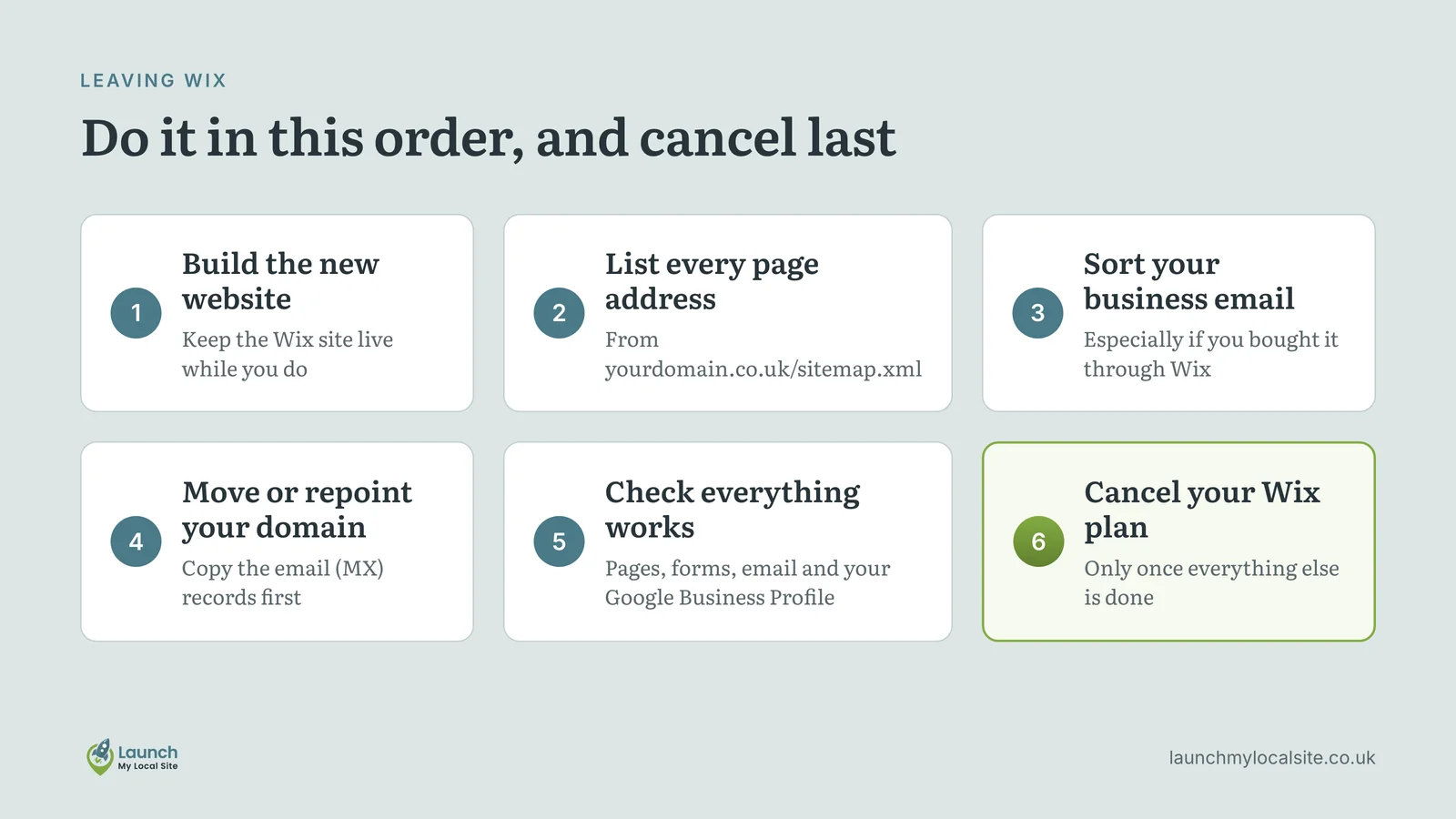
Do it in this order:
- Build the new website first, while the Wix site stays live. Your customers should never land on a missing page.
- List every page address on your Wix site, so each one can be redirected to the new site (more on this below).
- Sort your business email, especially if you bought it through Wix.
- Move or repoint your domain to the new website.
- Check everything works: pages, forms, email, Google Business Profile.
- Only then cancel your Wix plan.
Cancelling first is the most common mistake, and it is easily avoided.
What you can and cannot take with you
Because the site itself cannot be exported, it helps to know what can come out of Wix and what has to be copied by hand.
| What | Can you export it? |
|---|---|
| The website itself (design and pages) | No. It has to be rebuilt |
| Blog posts | No. Wix says exporting posts to other platforms is not possible, so they are copied across |
| Shop products | Yes, as a spreadsheet (CSV), up to 5,000 rows per file, not including digital products |
| Contacts | Yes, as a spreadsheet, up to 50,000 at a time |
| Form submissions | Yes, as a spreadsheet |
| Images and videos you uploaded | Yes, downloaded from the Media Manager |
| Wix's own free media and Shutterstock media | No. These need replacing |
If you have years of blog posts, budget some time (or ask whoever builds your new site) for copying them over. They are often worth keeping, because older posts can still bring visitors in from Google.
How to cancel your Wix subscription
On Wix, cancelling a plan and turning off auto-renew are the same thing. Go to Premium Subscriptions in your account, choose More Actions next to the plan, and select Cancel Plan. The plan keeps running until the end of the period you have paid for.
Three things catch people out:
- Yearly plans are charged early. Wix charges yearly and multi-year plans up to three weeks before they expire, and starts sending reminder emails 30 days before the payment date. If you are planning to leave, turn auto-renew off at least a month before your renewal date. You can always turn it back on.
- Refunds only cover new plans. Wix gives a full refund if you cancel a new Premium plan within 14 days. Renewals and upgrades are not covered, and neither are domains.
- Your domain, email and apps are separate. Cancelling the website plan does not cancel your domain, your business email or any paid apps. Each has its own subscription to cancel or move.
When the plan ends, your site is not deleted. It goes back to a free Wix address with Wix adverts on it, and your own domain stops showing it. Once your new site is live, you can move the old one to the trash yourself.
How to transfer your domain away from Wix
Your domain is the most valuable part of your online presence: it is on your van, your cards and every link to your business. What you do depends on where you bought it.
If you bought your domain from Wix
Wix lets the site owner transfer any domain in their account away. That includes a domain that came free for the first year with a plan.
For a .com or similar:
- Wix recommends turning off Private Registration on the domain first.
- In Domains, open Domain Actions and choose Transfer away from Wix.
- Wix emails an authorisation code to the domain's registered email address. Give it to your new provider.
Wix says transfers usually complete within seven days. There are timing rules to plan around: a domain cannot be transferred within 60 days of being bought, within 60 days of a change to the owner's contact details, or within 60 days of a previous transfer. So do not update your contact details just before you move.
For a .co.uk, the process uses an IPS tag instead of a code. Ask your new provider for their tag, then enter it under Transfer away from Wix. The new provider may need to accept the transfer within five days, or it can be rejected. If a transfer ever gets stuck, Nominet, which runs .uk domains, lets the owner change provider directly for £10 plus VAT.
Expect this to change: Nominet plans to replace IPS tags with a transfer code, much like the .com process, when it moves .uk to a new system on 9th February 2027.
If your domain was bought elsewhere
If your domain is with another company and only connected to Wix, nothing needs transferring. You remove it from your Wix account, then change its settings at your domain provider so it points at your new website.
One warning: if your domain was connected using Wix's nameservers, Wix holds all its settings, including your email settings (MX records). Before you switch the domain away, copy those records so they can be set up again at the new provider. Otherwise your email stops arriving until someone notices.
Keep your email working
Business email on Wix is tied to your domain, not your website. It keeps working after your website plan ends, so you do not have to rush.
If you bought Google Workspace through Wix, you can move it to Google directly by contacting Wix Customer Care. Wix says this cannot be undone, which is usually fine if you are leaving. Do it before you move the domain, so your mailbox does not depend on Wix while everything else changes.
If the domain itself is moving away from Wix, Wix's own guidance is that email stops until the MX records are added again at the new provider. Whoever is moving your domain should set those up on the same day. Copy any SPF and DKIM records too, or what you send is more likely to land in spam.
Keep your place in Google
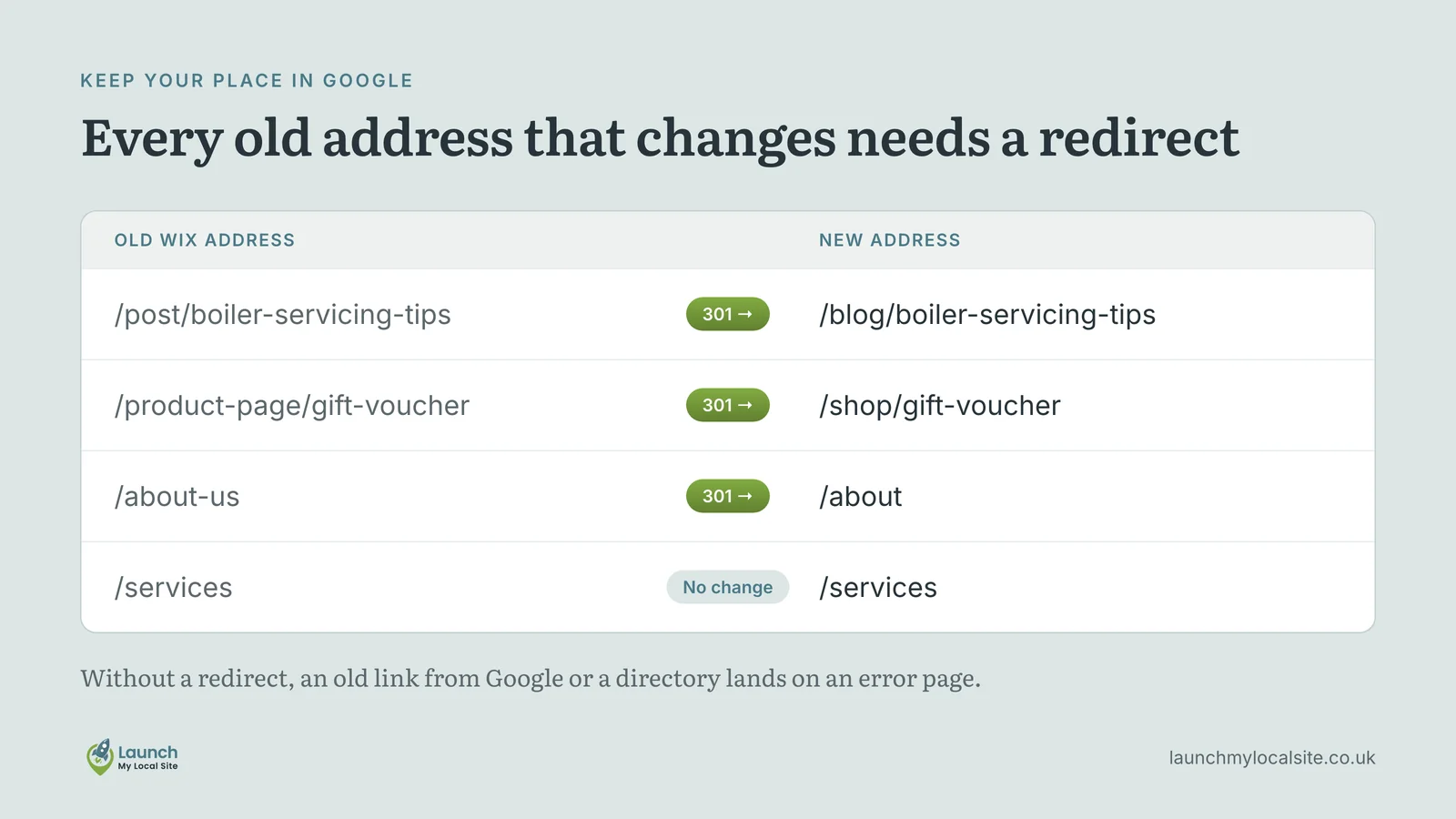
Google knows your website by its page addresses. When those change, Google needs to be told where each page has gone, with a permanent (301) redirect from every old address to its new equivalent.
Wix page addresses usually follow a pattern, which makes the list easier to build:
- Pages: yourdomain.co.uk/page-name
- Blog posts: yourdomain.co.uk/post/post-name
- Shop products: yourdomain.co.uk/product-page/product-name
For a complete list, open yourdomain.co.uk/sitemap.xml on your Wix site before you move. It links to separate lists of your pages, blog posts and products. Your new site then needs a redirect for each one that changes. Without them, anyone following an old link, from Google, your Google Business Profile, a directory listing or a post you once shared, lands on an error page, and Google gradually drops those pages.
Two more things to do on the day the new site goes live: update the website link on your Google Business Profile, and submit the new site's sitemap in Google Search Console if you use it. Done properly, you should keep most of what you have built up. Nobody can promise rankings, but skipping redirects is the most common way to lose them.
Expect some movement in Google while it catches up. Google says rankings can fluctuate during a move, and that most pages of a small site take a few weeks to move over. A week after launch, open a few old addresses from your list to check each lands on the right page, and look in Search Console's Page indexing report for any marked "Not found (404)".
Wix alternatives for a small business
Leaving Wix is not right for everyone, so here are the options. Wix no longer shows UK prices on its plans page: it shows US dollars for reference, says taxes are added based on your billing address, and shows the final price at checkout. Check your own renewal notice for what you actually pay.
| Option | What it costs | Who does the work |
|---|---|---|
| Stay on Wix, and get help with changes | Your Wix plan, plus help as you need it | You, or someone you pay for changes |
| Move to Squarespace | Similar to Wix | You |
| Move to WordPress | Hosting, plus someone to keep it updated | You or a developer |
| A managed website, like ours | £450 once you have approved the site, then £15 a month | We do: copy, build, hosting and updates |
Staying on Wix makes sense if you enjoy editing your site and it is bringing in the right enquiries. If you only need a hand now and then, we can make changes to your Wix site at £65 an hour, without moving anything.
Squarespace is the closest like-for-like move if you want to keep doing it yourself. Our Wix vs Squarespace comparison sets out the UK prices side by side. And our guide to UK website costs compares every option, from builders to agencies.
WordPress is the most flexible, but it is not hands-off. WordPress runs on PHP, and October's critical PHP security flaw, followed a week later by WordPress's own 7.1.4 security update, were reminders that someone has to keep the server, WordPress, the plugins and the theme up to date. Wix owners had nothing to patch for those, because Wix looks after its own servers.
A managed website is the option for owners who would rather not do it themselves. We write the copy, build the site, keep your domain and email where they are, set up the redirects, and look after it afterwards. Our websites are built in advance and served from Cloudflare's network, with no PHP or plugins to patch. You pay nothing until you have approved the new site. And you deal with one person throughout: the person you speak to on the first call builds your site, and is the one you ring or email whenever something needs changing. Our guide to moving your website explains how a move works.
Is it worth leaving Wix?
If your Wix site is doing its job, probably not: the time and effort are better spent elsewhere. Wix is a capable builder, and moving for the sake of it gains you little.
But if you are paying every year for a website that is not bringing in the customers you want, or you never have time to update it, moving can be worth it. A website planned around the customers you want helps bring the right enquiries straight to you, and that matters more than which builder it sits on.
What to do now
- Check your renewal date on your Premium Subscriptions page. If it is close and you plan to leave, turn off auto-renew now. You can turn it back on before the plan ends.
- Find out where your domain and email are registered, and make sure you can log in to both.
- Save a list of your page addresses from yourdomain.co.uk/sitemap.xml while the site is still live.
- Decide who builds the new site, and keep the Wix site running until it is ready.
- Cancel last, once the new site, your email and your redirects are all working.
If you are not sure where your website stands, send me your address and I'll tell you what a move would involve, or ring me on 07936 818254 to talk it through.
Sources
- Canceling a Wix Premium or Studio plan, Wix Help Center
- Renewing your yearly Premium plan, Wix Help Center
- Requesting a refund for a Premium plan, Wix Help Center
- Transferring your Wix domain away from Wix, Wix Help Center
- Transferring a .co.uk domain away from Wix, Wix Help Center
- Exporting or embedding your Wix site elsewhere, Wix Help Center
- Google Workspace FAQs, Wix Help Center
- Wix plans and pricing, Wix (shows US dollars for reference, read 6th November 2026)
- Can I switch registrar?, Nominet
- .UK standardisation FAQs and .UK is changing, Nominet
- Site moves with URL changes, Google Search Central
- Page indexing report, Search Console Help
Thinking of leaving Wix? I'll tell you what's involved
Send me your website address and I'll check how your domain, email and pages are set up, then tell you plainly what moving would involve, or whether staying on Wix makes more sense. Free, with no obligation. If you do move to us, it is £450 once you have approved the new site, then £15 a month.
Check my websiteFrequently asked questions
In your Wix account, go to Premium Subscriptions, choose More Actions next to the plan and select Cancel Plan. Cancelling and turning off auto-renew are the same thing on Wix: the plan runs to the end of the period you have paid for, then stops. Your domain, business email and any apps are separate subscriptions, so cancel or move each of those on its own.
Wix gives a full refund if you cancel a new Premium plan within 14 days of buying it. Renewals and upgrades of an existing plan are not covered, and neither are domains. After 14 days, the plan simply runs to the end of its term. Wix says refunds can take up to 45 business days to reach you.
It is not deleted. When the plan ends, the site goes back to a free Wix address (yourname.wixsite.com) with Wix adverts on it, and your own domain stops showing it. If you want the old site gone once your new one is live, move it to the trash in your Wix account yourself.
Not directly. Wix says its sites can only run on its own servers, so there is no way to export a Wix site and host it elsewhere. You rebuild the site on the new platform instead. Some content can be exported, such as contacts, form submissions and shop products as spreadsheets, but blog posts cannot be exported and have to be copied across.
For a .com or similar, Wix recommends turning off private registration first. Then choose Transfer away from Wix in the Domains section. Wix emails an authorisation code to the domain's registered email address, which you give to your new provider. For a .co.uk, get an IPS tag from your new provider and enter it under Transfer away from Wix instead. Nominet plans to replace IPS tags with a transfer code on 9th February 2027.
Wix says a transfer usually completes within seven days. For a .com or similar, a domain cannot be transferred within 60 days of being bought, within 60 days of a change to the owner's contact details, or within 60 days of a previous transfer. For a .co.uk, some providers have to accept the transfer by hand within five days or it lapses.
Not if you plan it. Business email on Wix is tied to your domain, not your website, so it keeps working after your website plan ends. The risk comes when the domain moves: its email settings (MX records) must be recreated at the new provider, or email stops until they are. If you bought Google Workspace through Wix, ask Wix to move the billing to Google first.
You should keep most of what you have built up if every old page address redirects to its new equivalent with a permanent (301) redirect, and your Google Business Profile points at the new site. Wix blog posts usually sit under /post/ and shop products under /product-page/, so those addresses need redirects too. Nobody can promise rankings, but skipping redirects is the most common way to lose them.
Yes, but it is rarely urgent. Wix asks you to cancel or transfer your subscriptions first, including any domain, then move your sites to the trash and close the account. A domain you cancel stays registered until it expires. Wix also says you can keep an account open for free once your paid subscriptions are cancelled, so there is no need to rush.
It depends on whether you want to keep doing the work yourself. If you do, Squarespace is the closest alternative. WordPress is the most flexible but needs keeping up to date. If you would rather someone else built and looked after it, a managed service like ours costs £450 once you have approved the site, then £15 a month.
Not in a way you have to manage. You cannot run PHP on a Wix website, and Wix runs and updates its own servers. Its status page showed no incidents linked to the flaw in October 2026. Keep your Wix password strong and turn on two-step login, as with any account.